Scale
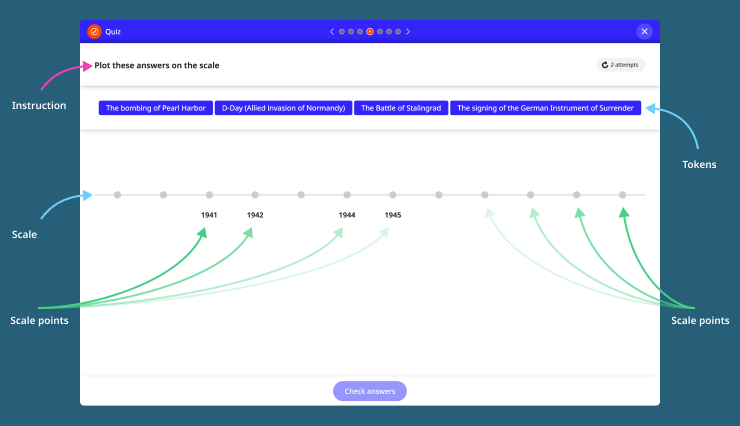
In this quiz activity, users drag-and-drop labels to points on a scale. The author creates the scale by configuring the scale points and adding answers against scales points.
What are the benefits of this activity and when might I use it?
The Scale activity creates interactivity and encourages deep thinking skills rather than simple recall by challenging learners to compare and contrast values and criteria. Challenge your learners to plot events or milestones in chronological order, sequence or rank objects and units by scale or probability – the possibilities are vast with its flexible authoring. Pitch the complexity according to your audience: choose to include unit labels on every scale point or hide them to increase the challenge!
How many scale points and answers can I author?
Each scale can have up to 12 points, with one answer assigned to each point. This limit has been set to optimise usability across devices.
Can I decide how many marks this activity is worth?
Yes, you have two options. You can give the activity one mark in total. This means users must assign all the labels correctly to achieve the mark. Alternatively, you can give users a mark for each label they assign to a scale point correctly. The number of marks the activity is worth depends on the total number of correct labels.
Can I configure the scale appearance?
Yes, the scale can be made horizontal or vertical. Although, mobile devices will always preview the scale vertically. Additionally, scale point labels don’t have to always be visible; they can be hidden to make the question more challenging and to engage learners by requiring them to calculate the missing points.
Hints and tips
- The tokens you author will appear above the image in the activity. All tokens will be jumbled.